RobOS App Suite
30+ purpose-built Electron apps covering the full software delivery lifecycle — including AI Prompt (natural-language OS control) and Skills Manager (reusable shell skill packs).
Table of contents
- App Launcher
- Core Workflow Apps
- Dashboard Apps
- Configuration & Security Apps
- AI Shell & Skills
- System Services
All apps share a consistent dark theme (#0d1117 background, #00bcd4 cyan accent), use contextBridge IPC for security, and expose DOM snapshot debug servers for automated testing.
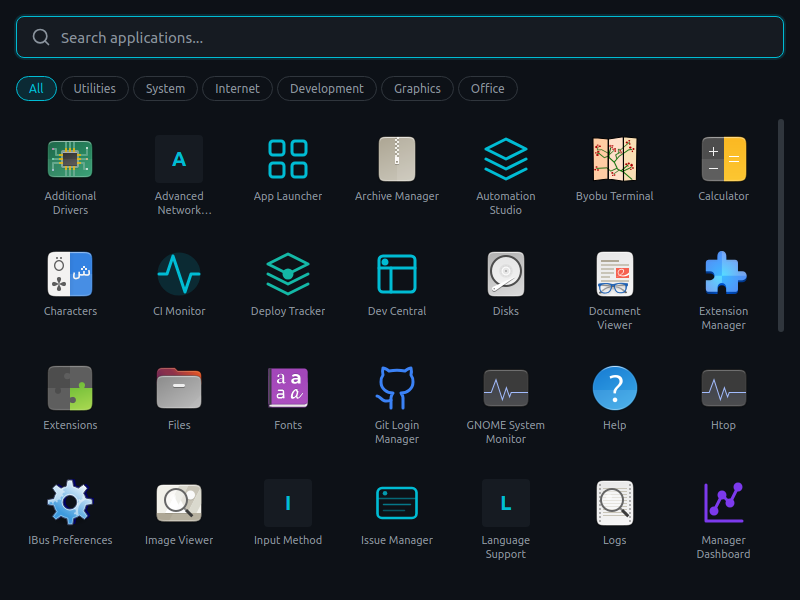
App Launcher
The entry point to RobOS — a searchable grid of all installed applications with category filtering.
Core Workflow Apps
These apps drive the main development flow — from picking up a task to deploying code.
Task Board
 Kanban and list view of all issues from your task server. Filter by state, assignee, or search.
Issue Manager
 GitHub Issues client with AI issue breakdown, workflow state transitions, and workspace provisioning from any issue.
PR Review Board
 AI-assisted code review with change summaries, risk assessment, interactive breakpoint review, and one-click approval.
CI Monitor
 Watch CI/CD pipelines in real time. AI diagnoses failures and suggests fixes. One-click rerun.
Git Projects
 The front door to every git repository on the team — clone, run dev-setup scripts, open in any IDE, browse GitHub repos you already have access to. AI-generated dev-setup, test, and run scripts per project.
Workspace Manager
 Discover and manage local workspaces. Open in any IDE. Auto-provisions workspace per task with branch, deps, and dev server.
AI Agent Manager
 Manage AI agent sessions (Claude Code, Copilot, Codex, Gemini). Assign agents to tasks. Monitor questionnaire, draft, and review-fix cycles.
Context Manager
 Curate AI context sources — files, folders, URLs, repos, tickets. Auto-attached when an agent starts working on a task.
Dev Tools
 Install and manage IDEs, CLI tools, and cloud SDKs. 19 tools including Claude CLI, VS Code, JetBrains suite, Docker, ripgrep.
Dashboard Apps
Real-time visibility for every role on the team.
Dev Central
 Daily developer dashboard: my tasks, my PRs, review requests, AI standup summary, and blocker radar.
Manager Dashboard
 Sprint board, velocity charts, per-developer metrics, deployment history, and team health indicators.
Deploy Tracker
 Deployment timeline with per-version story lists, deploy frequency KPIs, and rollback tracking.
Report Builder
 Generate sprint reports, velocity summaries, and team performance reports with AI-assisted insights.
Stage Demo Viewer
 AI-generated demo walkthroughs of merged PRs. Product owners can review changes before production deploy.
Configuration & Security Apps
Set up your development environment and manage credentials.
Security Setup
 First-run wizard: GPG key generation, SSH key setup, GitHub authentication, and password store initialization.
Git Login Manager
 Verify GitHub CLI auth, SSH key presence, SSH connectivity to GitHub, and git identity configuration.
Pass Manager
 GUI for GPG-encrypted password store. Create, view, edit, and delete secrets. Team secret distribution.
Task Servers
 Configure connections to Jira, GitHub Issues, or Linear. Authentication, project mapping, and bidirectional sync.
Workflow Studio
 Define custom task workflows with AI generation. Configure issue types, states, and event-driven transitions.
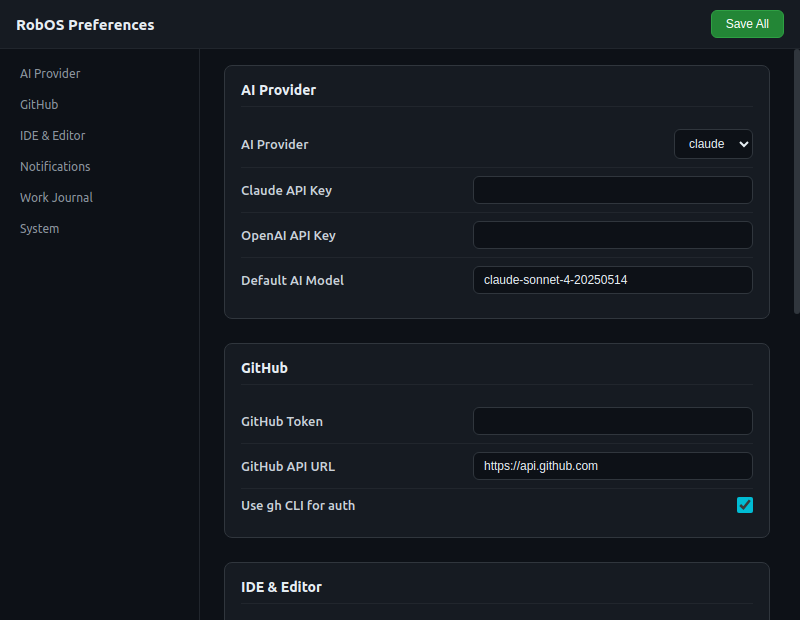
RobOS Preferences
 System-wide settings: credentials, AI model preferences, notification config, and theme customization.
AI Shell & Skills
Natural-language AI control of the operating system — powered by a library of reusable shell skill packs.
RobOS AI Prompt
 Talk to your OS in plain English. Select pre-built shell skills from the sidebar, fill in any required parameters, type a prompt (or skip it), and let an AI agent run the commands and explain the results in a structured step-by-step report.
Key features:
- Skills sidebar — 70+ built-in skills across 10 categories (File Operations, Git, Process Management, Docker, Network, Security, System, Package Management, Text Processing, Development). Filter by search or browse by category.
- Skill parameter inputs — Skills with
$VARIABLEplaceholders expand into inline input cards so you can fill in filenames, ports, search patterns, and more before running. - Skills-only mode — Select one or more skills and hit Run without entering a prompt; the AI automatically runs all selected skills and returns a unified report.
- AI agent selector — Switch between Claude, GitHub Copilot, Codex, and Gemini via the agent pill in the header. Auth status is checked on load with an inline banner if login is needed.
- Structured results — Every run returns a numbered step list with the command, live output, and a plain-English explanation. Failed steps are highlighted in red.
- Run history — Every prompt+result pair is persisted so you can scroll back through past runs and re-apply them.
Example prompts:
Show me what's eating disk space in my home directory
Kill all processes listening on port 3000
Find all TODO comments in the current git repo
Run a full git status and show me what needs committing
Skills Manager
 Browse, install, and manage AI shell skills. Ships with 70+ built-in skills and supports importing community skill packs from popular GitHub repositories.
Built-in skill categories:
| Category | Example skills |
|---|---|
| File Operations | disk-usage, find-large-files, json-pretty, csv-summary, count-lines |
| Process Management | list-processes, kill-port, top-cpu, top-memory, port-in-use |
| Git | git-status, git-log, git-branches, git-stash, git-cleanup |
| Network | check-connectivity, open-ports, http-test, dns-lookup, wifi-info |
| Docker | docker-containers, docker-images, docker-logs, docker-cleanup |
| System | system-info, memory-usage, cpu-info, uptime, environment-vars |
| Package Management | npm-outdated, pip-list, apt-upgradable, node-version |
| Text Processing | grep-recursive, word-count, find-duplicates, sort-lines |
| Security | check-permissions, find-suid, ssh-keys, listening-services |
| Development | run-tests, lint-js, find-todos, check-syntax, node-modules-size |
Community skill packs — The Skills Manager can clone any GitHub repository of shell skills and register them as a custom pack. Use the Add Pack panel to paste a repo URL, preview the skills it contains, and install it with one click.
Skill structure — each skill is a JSON object with id, name, description, category, command, and optional $VAR parameters. Custom skills are stored in ~/.config/robos/skills.json.
How skills connect to AI Prompt
Skills Manager  ──(stores)──▶  ~/.config/robos/skills.json
                                         │
                              skills-data.js (built-ins)
                                         │
                                         ▼
AI Prompt ──── sidebar ────▶  selects skill(s)
               ▼
       fills $PARAM values
               ▼
       AI agent runs commands + returns structured report
The AI Prompt app loads skills from both skills-data.js (built-ins) and ~/.config/robos/skills.json (custom/community), groups them by category, and substitutes any $PARAM values you fill in before constructing the AI prompt.
System Services
Background services and desktop integration.
Automation Studio
 Create event-driven rules (event → condition → action). Manage scheduled AI agent jobs. View event log.
Notifications
 Notification history viewer. Filter by category (PR, CI/CD, System) and tier (Critical, Warning, Info).
Search Index
 File system indexer for @-mention search in AI textareas. Fast lookup across all project files.